Allen Bradley PLC Software Studio 5000 Free Download – Complete Guide!
Studio 5000 is not completely free; however, users can access trial versions, demos, and educational licenses to learn PLC programming, install software, and practice industrial automation projects effectively.
If you’re searching for Allen Bradley PLC Software Studio 5000 free download, you’re not alone. Thousands of automation engineers, students, and beginners want access to this powerful PLC programming software used in real-world industrial automation systems.
But here’s the honest answer upfront:
👉 Studio 5000 is NOT completely free.
However, there are trial versions, demo tools, and legal ways to access it, which we’ll cover step-by-step in this guide.
This article combines official insights, practical tutorials, and beginner-friendly explanations so you can understand how to download, install, and use Studio 5000 Logix Designer the right way.
What is Allen Bradley PLC Software Studio 5000?
Studio 5000 is an advanced PLC programming software developed by Rockwell Automation for Allen Bradley controllers like:
- ControlLogix
- CompactLogix
- MicroLogix
It provides a complete development environment for:
- Ladder logic programming
- Controller configuration
- Industrial network setup (EtherNet/IP)
- HMI integration using FactoryTalk
The core application inside Studio 5000 is called:
👉 Logix Designer
This is where engineers write, test, and deploy automation programs.
Key Features of Studio 5000 Software
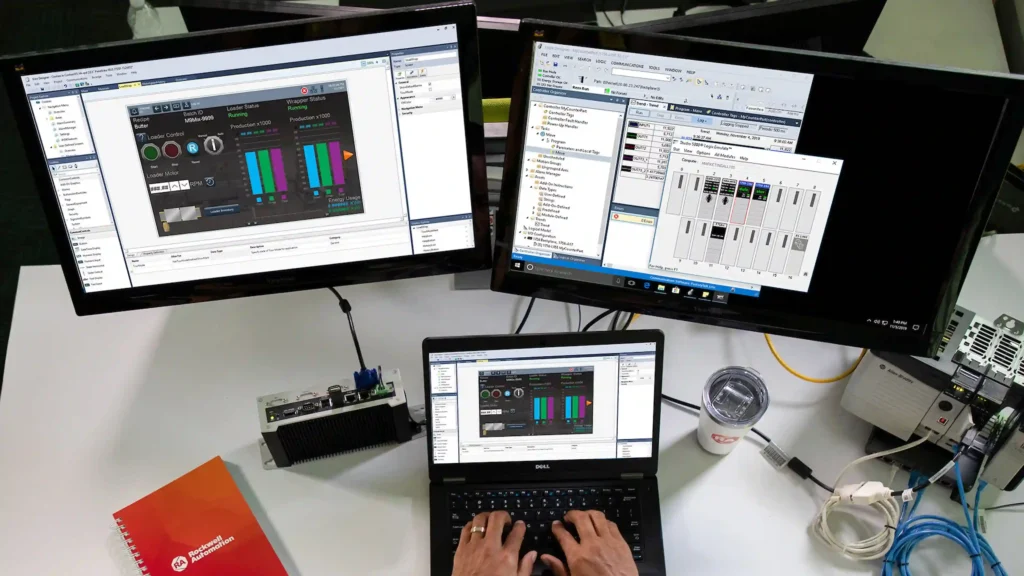
Understanding its features helps explain why it’s widely used in industrial control systems.
1. Unified Development Environment
Studio 5000 combines multiple tools into one platform:
- Logix Designer
- FactoryTalk Services Platform
- View Designer
This improves productivity and reduces commissioning time.
2. Advanced PLC Programming
Supports multiple programming languages:
- Ladder Logic
- Function Block Diagram
- Structured Text
Perfect for automation engineering software needs.
3. Seamless Hardware Integration
Works directly with:
- CompactLogix controllers
- ControlLogix controllers
Ensuring firmware compatibility and real-time control.
4. Scalable Industrial Automation
From small machines to large factories, Studio 5000 supports:
- Machine automation
- Process automation
- Industrial network configuration
Is Studio 5000 Free to Download?
This is the most searched question:
👉 “Is Studio 5000 free?”
❌ Full Version
- Not free
- Requires paid license / subscription licensing
- Needs activation key or serial number
✅ Free Options Available
You can still access it legally through:
- Free Trial Version
- Student / educational access
- Demo software (limited features)
How to Download Studio 5000 (Step-by-Step Guide)?
Follow this safe and official method to download Studio 5000.
Step 1: Visit Official Portal
Go to the Product Download Center by Rockwell Automation.
Step 2: Create an Account
You’ll need:
- Email registration
- Company or student details
Step 3: Search for Software
Search for:
- Studio 5000 Logix Designer
- RSLogix 5000
Step 4: Enter License or Trial Access
- Enter serial number (if purchased)
- Or request trial license
Step 5: Download Software Package
Download includes:
- Installation files
- FactoryTalk Services Platform
- Required dependencies
How to Install Studio 5000 on Windows?
After downloading, follow this installation guide.
System Requirements
Before installing, ensure:
- Windows 10 / 11 (64-bit)
- Minimum 8GB RAM
- SSD recommended
- Compatible firmware version
Installation Steps
- Run setup.exe
- Install FactoryTalk Services Platform
- Install Logix Designer application
- Restart your system
- Activate license using activation manager
Studio 5000 Trial Version (What You Need to Know)
The trial version is useful for beginners.
Key Limitations
- Time-limited access
- Some features restricted
- Requires login
Best Use Cases
- Learning PLC programming
- Testing automation projects
- Student practice
Studio 5000 vs RSLogix 5000
Many users search:
👉 RSLogix 5000 vs Studio 5000
Here’s the difference:
| Feature | RSLogix 5000 | Studio 5000 |
| Platform | Older | Modern |
| Integration | Limited | Full FactoryTalk integration |
| UI | Basic | Advanced |
| Updates | Discontinued | Actively maintained |
👉 Studio 5000 is the upgraded version of RSLogix 5000.
Common Problems During Download & Installation
1. License Error
Cause: No activation key
Solution: Use trial license or purchase
2. Compatibility Issues
Cause: Wrong firmware version
Solution: Match software version with controller
3. Installation Failure
Cause: Missing dependencies
Solution: Install FactoryTalk first
Free Alternatives to Studio 5000 (Important for SEO Ranking)

Since Studio 5000 is not free, here are free PLC programming software options:
1. OpenPLC
- Open-source PLC platform
- Great for beginners
2. CODESYS
- Popular automation software
- Supports multiple controllers
3. Siemens TIA Portal (Trial)
- Industrial-grade software
- Free trial available
👉 These are excellent for learning PLC programming without cost.
Studio 5000 for Students and Beginners
If you’re a beginner searching:
👉 “Studio 5000 free download for students”
Here’s what you can do:
- Use trial version
- Access through university labs
- Practice using PLC simulation software
- Start with ladder logic programming basics
Tips to Use Studio 5000 Efficiently
To improve your workflow:
- Always match firmware compatibility
- Use offline programming mode
- Organize projects properly
- Learn EtherNet/IP configuration
- Use debugging tools
FAQs:
1. Can I download Studio 5000 for free?
Studio 5000 is not fully free. You need a paid license for full access, but trial versions and educational options are available, allowing beginners and students to explore PLC programming features with limited functionality for learning purposes.
2. What is Studio 5000 used for?
Studio 5000 is used for PLC programming, controller configuration, and industrial automation development. It supports ladder logic, structured text, and integrates with FactoryTalk for designing, testing, and deploying automation systems efficiently.
3. How can beginners access Studio 5000?
Beginners can access Studio 5000 through trial versions, student licenses, or university labs. They can also use simulation tools and start learning ladder logic programming before working on real industrial automation systems.
4. What are the system requirements for Studio 5000?
To run Studio 5000, users need Windows 10 or 11 (64-bit), at least 8GB RAM, and sufficient storage. Compatibility with controller firmware and installing FactoryTalk Services Platform are also essential for proper installation.
5. Are there free alternatives to Studio 5000?
Yes, alternatives to Studio 5000 include OpenPLC, CODESYS, and Siemens TIA Portal trial. These tools help users learn PLC programming and industrial automation without requiring expensive licenses.
Conclusion
Studio 5000 is a powerful industrial automation tool, but it is not entirely free. Users can still benefit from trial versions, educational access, and alternative PLC software to build skills. By following official download methods, understanding system requirements, and practicing regularly, beginners and professionals can effectively learn PLC programming. Whether you aim to work with ControlLogix or CompactLogix systems, mastering Studio 5000 provides a strong foundation for a successful career in automation engineering.

2 Comments