Edvera Licensing and Accreditation Management Software User Guide
Edvera Licensing and Accreditation Management Software is a cloud-based platform that automates licensing, accreditation, compliance tracking, document management, and workflows, helping organizations streamline regulatory processes, reduce errors, and improve operational efficiency.
In today’s digital era, organizations rely on licensing management software and accreditation management systems to streamline compliance, reduce manual errors, and improve efficiency. The Edvera Licensing and Accreditation Management Software is a powerful cloud-based licensing system designed to help organizations manage regulatory processes, documentation, and approvals in one centralized platform.
This comprehensive user guide will walk you through how to use the Edvera platform, its features, workflows, and best practices to maximize productivity and ensure full compliance with regulatory standards.
What Is Edvera Licensing and Accreditation Management Software?
The Edvera platform is an advanced SaaS platform that helps organizations manage:
- Licensing processes
- Accreditation workflows
- Compliance tracking
- Document verification
- Audit management
It acts as a digital licensing platform that connects regulatory authorities, accreditation bodies, and organizations in a unified system.
Key Purpose
The main goal of Edvera is to simplify the approval process, automate workflows, and ensure adherence to compliance standards through real-time monitoring and reporting.
Key Features of Edvera Software
1. Licensing Management System
Edvera offers a complete license application tracking system that allows users to:
- Submit license applications online
- Track approval status
- Manage license renewals
- Verify credentials
This feature eliminates paperwork and improves transparency in the licensing process.
2. Accreditation Management System
The platform provides a robust accreditation process software module that enables:
- Accreditation application submission
- Evaluation workflows
- Communication with accreditation bodies
- Status tracking
This ensures efficient handling of accreditation requirements across industries.
3. Workflow Automation Software
Edvera includes powerful workflow automation software to streamline operations:
- Automated approval workflows
- Task assignments
- Notification alerts
- Escalation management
This reduces delays and improves operational efficiency.
4. Document Management System
The built-in document management system allows users to:
- Upload and store documents securely
- Manage version control
- Enable document verification
- Maintain compliance records
This feature ensures easy access and secure storage of critical files.
5. Compliance Tracking and Monitoring
Edvera functions as a compliance monitoring platform by offering:
- Real-time compliance tracking
- Audit trails
- Regulatory compliance tools
- Risk identification
Organizations can easily track whether they meet required standards.
6. Reporting and Analytics Dashboard
The reporting and analytics module provides:
- Compliance reports
- Performance insights
- Custom dashboards
- Data-driven decision-making tools
This helps organizations improve efficiency and accountability.
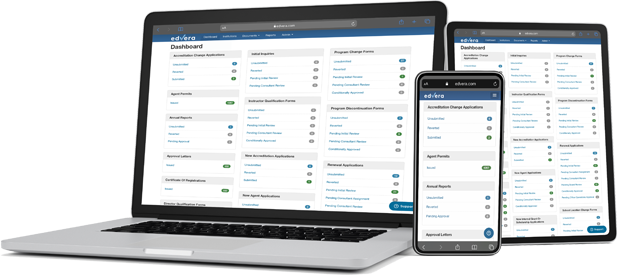
System Dashboard Overview
The system dashboard is the central hub of the Edvera platform. It provides:
- Overview of licensing and accreditation status
- Pending approvals
- Notifications and alerts
- Key performance indicators
The intuitive user interface (UI) ensures ease of navigation for both beginners and advanced users.
User Roles and Permissions
Edvera supports role-based access through user roles and permissions, including:
- Admin users
- Compliance officers
- Reviewers
- Applicants
Each role has specific access rights, ensuring data security and privacy.
Step-by-Step Guide: How to Use Edvera Software?
Step 1: User Registration and Login
- Create an account on the Edvera platform
- Verify your credentials
- Log in to access the dashboard
Step 2: System Configuration
Set up your system by:
- Defining organizational details
- Configuring workflows
- Setting compliance standards
This step ensures the system aligns with your business needs.
Step 3: Submit License or Accreditation Application
- Fill out the application form
- Upload required documents
- Submit for review
The application management system ensures smooth submission.
Step 4: Document Verification
- Review uploaded documents
- Validate authenticity
- Approve or request changes
This process ensures compliance with regulatory requirements.
Step 5: Workflow Processing
- Assign tasks to reviewers
- Track approval stages
- Automate notifications
The approval workflow software keeps everything organized.
Step 6: Compliance Reporting
- Generate reports
- Analyze compliance data
- Monitor performance
This helps in maintaining regulatory standards efficiently.
Step 7: License Renewal Tracking
- Set renewal reminders
- Track expiration dates
- Submit renewal applications
This feature ensures continuous compliance.
Benefits of Using Edvera Licensing Software
1. Improved Efficiency
Automation reduces manual tasks and speeds up processes.
2. Reduced Compliance Errors
Accurate tracking minimizes mistakes in regulatory compliance.
3. Centralized Data Management
All data is stored in a single enterprise compliance software system.
4. Enhanced Transparency
Real-time tracking improves visibility across processes.
5. Better Decision-Making
Advanced analytics support informed decisions.
How Edvera Improves Accreditation Efficiency?
Edvera helps organizations:
- Automate accreditation workflows
- Reduce processing time
- Improve communication with stakeholders
- Maintain accurate records
This results in faster approvals and improved compliance.
Use Cases of Edvera Software
1. Government Agencies
Used for managing licenses and regulatory approvals.
2. Healthcare Sector
Supports healthcare accreditation software needs.
3. Educational Institutions
Manages education licensing systems and certifications.
4. Enterprises
Acts as an enterprise accreditation platform for compliance management.
Best Practices for Using Edvera Software
Use Clear Data Entry
Ensure all information is accurate and complete.
Maintain Document Consistency
Keep documents updated and well-organized.
Automate Workflows
Leverage automation to save time.
Monitor Compliance Regularly
Track compliance status frequently.
Train Users
Provide training for better system usage.
Common Challenges and Solutions
Challenge 1: Data Errors
Solution: Use validation rules and verification processes.
Challenge 2: Workflow Delays
Solution: Automate approvals and notifications.
Challenge 3: Poor User Adoption
Solution: Provide training and user support.
Future of Licensing and Accreditation Software
The future of licensing and accreditation management software lies in:
- AI-powered automation
- Advanced analytics
- Real-time compliance monitoring
- Integration with other enterprise systems
Platforms like Edvera are leading the digital transformation in compliance management.
Why Choose Edvera Platform?
Edvera stands out as a cloud software solution because it offers:
- Scalability
- Security
- Flexibility
- Automation
- User-friendly interface
It is an ideal solution for organizations looking to manage regulatory compliance digitally.
FAQs:
1. What is Edvera Licensing and Accreditation Management Software used for?
Edvera software is used to manage licensing and accreditation processes digitally. It helps organizations handle applications, track approvals, monitor compliance, manage documents, and automate workflows, ensuring efficient regulatory operations and reducing manual errors across departments.
2. How does Edvera improve compliance management?
Edvera improves compliance management by providing real-time tracking, audit trails, and automated reporting tools. It ensures organizations meet regulatory standards, reduces compliance risks, and allows teams to monitor performance through centralized dashboards and analytics features.
3. Can Edvera automate licensing and accreditation workflows?
Yes, Edvera includes workflow automation features that streamline approvals, assign tasks, send notifications, and track progress. This reduces delays, eliminates manual processes, and ensures faster decision-making in licensing and accreditation management systems.
4. Who can use the Edvera platform?
Edvera is designed for government agencies, educational institutions, healthcare organizations, and enterprises. It supports multiple user roles like administrators, reviewers, and applicants, making it suitable for any organization managing regulatory compliance or accreditation processes.
5. What are the key benefits of using Edvera software?
Key benefits include improved efficiency, reduced compliance errors, centralized data management, enhanced transparency, and better decision-making. Edvera helps organizations streamline workflows, automate processes, and maintain accurate records for licensing and accreditation management.
Conclusion
Edvera Licensing and Accreditation Management Software is a powerful solution for modern organizations seeking efficient compliance management. By automating workflows, centralizing data, and enabling real-time monitoring, it simplifies complex licensing and accreditation processes. The platform improves accuracy, reduces manual effort, and enhances transparency across operations. With its user-friendly interface and advanced features, Edvera supports organizations in meeting regulatory requirements effectively. Adopting such digital solutions ensures long-term efficiency, better decision-making, and successful compliance in today’s evolving technological landscape.



One Comment